 |
|
|
|
|
 |
 |
 |
|||
|
|
SpamWeasel Support Issues Q. Why am I having trouble collecting mail with SpamWeasel Pro? A. If there are a large number of e-mails to collect from your ISP, your e-mail client can time-out before SpamWeasel Free has collected them. When your e-mail client requests a POP collection, SpamWeasel goes out to collect the data from your ISP POP account. Because of the way POP3 works, and because SpamWeasel may be configured to not pass some mail through, SpamWeasel can't reply to your client until it has finnished checking all the mail collected. Unfortunately the POP3 protocol has no facility to keep the connection between your client and SpamWeasel alive, and while SpamWeasel is busy collecting mail from your POP account the e-mail client could timeout while waiting for a response. Keeping the connection alive SpamWeasel Pro sends a "." character every so often to preserve the connection between client and SW. Not all clients recognise this process and will still need the timeout setting increased (see below). Mail clients that support SpamWeasel's method of keeping the connection alive are listed below: Eudora Calypso 3 PoCo Mail Incredi Mail Xe Netscape/Mozilla Setting the Maximum E-mail Collection Time If your e-mail client doesn't support the keep-alive feature, the second option is to use the "Maximum e-mail collection time" setting. The value for this should be set to around 10 seconds less than the timeout setting in your e-mail client (see the e-mail client configuration section for details on how to check your timeout setting). 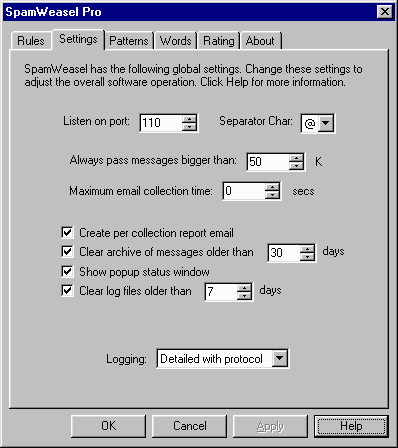 When this option is set, SpamWeasel will stop collecting mail once the timeout is exceeded, and the remaining mails will be collected next time your e-mail client does a collection. This option is disabled when the "Maximum e-mail collection time" value is set to "0" (which is the default setting).  Return To FAQ Return To FAQ |
 |
|
|


