 |
|
|
|
|
 |
 |
 |
|||
|
|
POPWeasel Support Issues Q. Why is there a problem connecting to my mail server via SMTP? A. By default, the SMTP authentication mode in POPWeasel isn't correctly initialised. This only affects version 2.0.28 and earlier. In some cases POPWeasel will incorrectly try to use authenticated login when this is not required, which can cause connection failure. A simple workaround is to initialise the required setting by using the Auth dialog as follows: 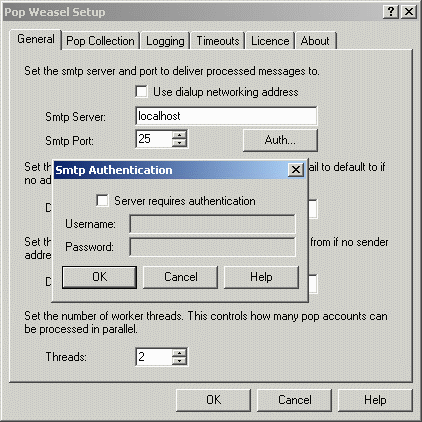 Click on Start | Programs | POPWeasel | POPWeasel Configuration. On the General tab of the configuration window, click the "Auth" button. If your SMTP mail server requires authentication, check this option and set the details accordingly. If your SMTP server doesn't require authentication, make sure that you leave the settings blank and click the OK button. This ensures the settings are correctly configured.  Return To FAQ Return To FAQ |
 |
|
|


