 |
|
|
|
|
 |
 |
 |
|||
|
|
MailGate Support Issues Q. Why am I not collecting any mail? A. First you should determine whether or not MailGate is collecting mail successfully: Go to the Connection History, situated at the bottom of the MailGate window, and check the very top item. If there is a red cross beside the telephone icon then MailGate may have encountered a problem during the collection. Click on the [+] sign to the left; a red unhappy face should inform you of the error that occurred: The POP3 server you're connecting to is not accessible 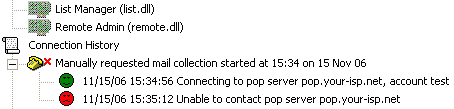 If this error occurs you may wish to check that you don't have a firewall blocking outgoing POP3 transactions (on port 110). There is a problem logging on to your account 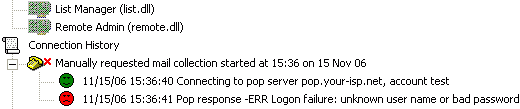 This occurs if the account name/password is incorrect. You should try re-entering your details (under Gateway | Setup | POP tab), or contact your ISP to confirm your settings. Other errors If you find an error other than those above you may need to contact your ISP for help. Alternatively you can contact Mailgate support. If there are no errors If the Connection History seems to indicate that MailGate has connected to your ISP's POP3 server, logged on to your account, and that messages have been collected without any error, we recommend checking the FAQ here.  Return To FAQ Return To FAQ |
 |
|
|


