 |
|
|
|
|
 |
 |
 |
|||
|
|
MailGate Support Issues Q. Why isn't MailGate sending my mail? A. If you have mail sitting in the Outgoing Queue on the main MailGate window, and it should have been sent, the following information should help pinpoint where the problem lies. First of all, in the Connection History, situated at the bottom of the MailGate window, check the very top item. If there is a red cross beside the telephone icon, click on the [+] sign to the left; a red unhappy face should inform you of the error that occurred: The SMTP server you're sending to is not accessible 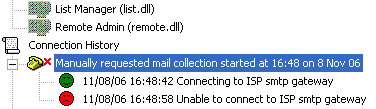 If this error occurs you may wish to check that you don't have a firewall blocking outgoing SMTP transactions (on port 25). There is a problem sending one of the messages in the queue  This usually occurs if the .msg file associated with the e-mail, situated in the queue directory, is locked by another application. This could relate to the MailGate Extensions Modules. Other errors If you find an error other than those above you may need to contact your ISP. Alternatively you can contact Mailgate support. If there is no error If no error can be found in the Connection History, and there are messages sitting in the Outgoing Queue, it may be that you haven't set up MailGate to send mail regularly. If you have a new installation of MailGate, check the 'schedules' at the top of the MailGate window and make sure that you have a 'Transfer e-mail' schedule. Without this you may find that MailGate isn't connecting to send the mail. To add an e-mail transfer schedule, do the following:
 Return To FAQ Return To FAQ |
 |
|
|


