|
|
MailGate Support Issues
Q. How can I prevent downloading of specific file types via the Web proxy?
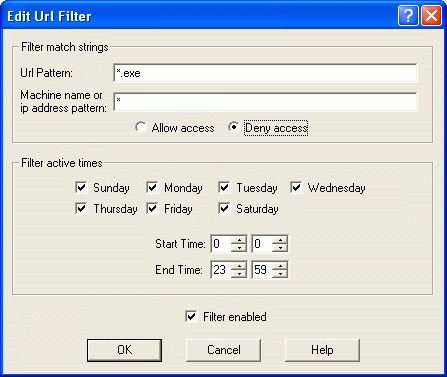
A. This can be done by setting up URL filters for the file extensions you wish to prevent from being downloaded.
- Click on Edit | New | URL Filter.
- In the URL Pattern field, type in the extension prefixed by a "*", e.g.:
*.exe (this will apply the filter to any file with the ".exe" extension).
- In the "Machine name or IP address pattern" field, specify the address (or address range, using wildcard values) of the machines the filter applies to, e.g.:
* (this will apply the filter to all machines)
- Set the radio button to "Deny access".
- Set the time/days that the filter is active (default is set to all day, every day).
 Return To FAQ Return To FAQ
|

|
|





