 |
|
|
|
|
 |
 |
 |
|||
|
|
MailGate Support Issues Q. Does MailGate work with ZoneAlarm? A. MailGate works fine with ZoneAlarm, just follow the instructions below. Configuring ZoneAlarm On the ZoneAlarm configuration window, click on the Security button. Set the Local security level to "Low", leave the Internet security level at the "High" default. 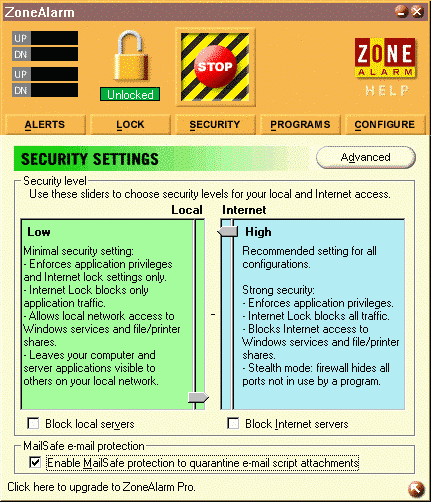 Next click on the Advanced button, and the Local Zone Properties widow will appear. Click the Add button, then select "IP Range". Note - You can set up access for ranges or single IP addresses by clicking on the Add button and selecting the appropriate option. This FAQ explains how to set up a range of IP addresses to give your network access to MailGate via ZoneAlarm. 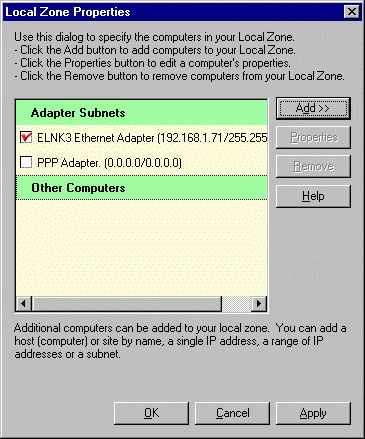 Type a brief description into the Description tab. In the From field, enter the IP address of the first machine in the range. In the To field, enter the IP address of the last machine in the range. 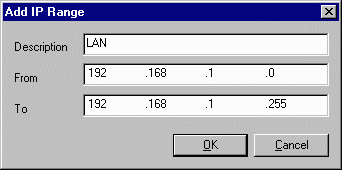 As MailGate operates as a server, ZoneAlarm will detect this and ask you whether it should be allowed. Check the "Remember this answer the next time I use this program", then click on the Yes button. 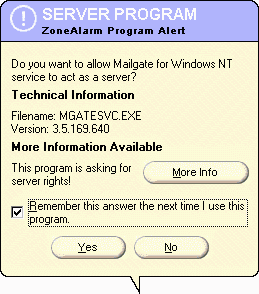 When MailGate attempts to access the Internet ZoneAlarm should pop-up an alert box, asking if you wish to allow MailGate access to the Internet. Check the "Remember this answer the next time I use this program", then click on the Yes button. 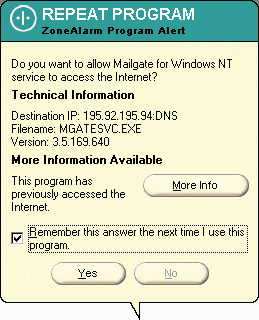 ZoneAlarm can be downloaded from www.zonealarm.com  Return To FAQ Return To FAQ |
 |
|
|


