|
|
MailGate Support Issues
Q. How do I set up MailGate to use MSN Messenger?
A. You can use MSN Messenger either via Socks or HTTP.
Running MSN Messenger over HTTP:
In MailGate...
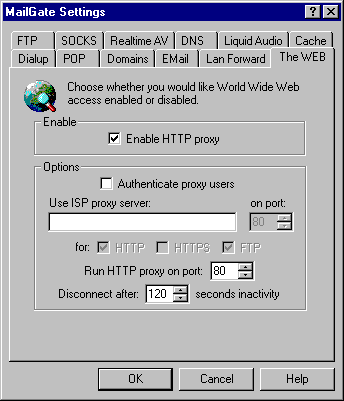
- Click on Gateway | Setup | The Web tab.
- Make sure that the "Enable HTTP proxy" box is checked, note the number in the "Run HTTP proxy on port" setting (this is usually 80).
In MSN Messneger...
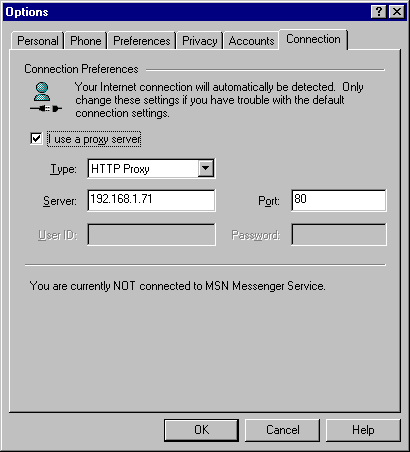
- Click on Tools | Options | Connections tab.
- Check the "I use a proxy server" box. Set the "Type" drop-down menu to "HTTP proxy". Set the "Server" field to the IP address of the machine MailGate is on. And set the port to the port specified on the Web tab in MailGate (usually 80).
Running MSN Messenger over SOCKS:
In MailGate...
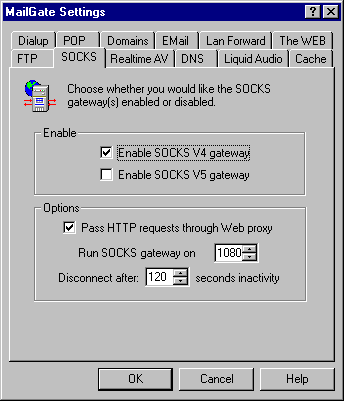
- Click on Gateway | Setup | Socks tab.
- Make sure that the "Enable SOCKS V4 gateway" box is checked, make sure that the SOCKS port is set to 1080.
In MSN Messneger...
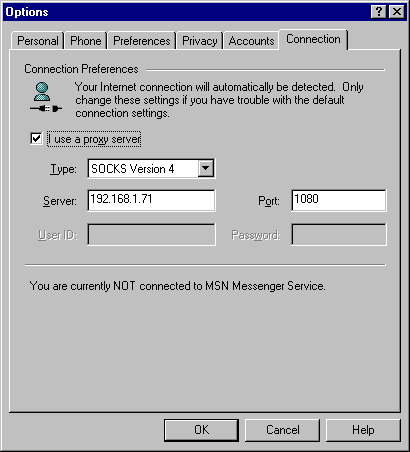
- Click on Tools | Options | Connections tab.
- Check the "I use a proxy server" box. Set the "Type" drop-down menu to "SOCKS Version 4". Set the "Server" field to the IP address of the machine MailGate is on. And set the port to 1080.
 Return To FAQ Return To FAQ
|

|
|





