 |
|
|
|
|
 |
 |
 |
|||
|
|
MailGate Support Issues Q. How do I set up MailGate to proxy RealPlayer G2 A. MailGate provides a built in proxy for use with RealPlayer. Warning - Enabling Real Player to run in the System tray could initiate unwanted proxy connections. With a dial-up connection this could lead to some large phone bills. Proxy requirements - RealPlayer connects through MailGate using the Realtime AV protocol. It also requires DNS access through the DNS relay option Realtime AV proxy In MailGate, click on Gateway|Setup, and select the Realtime AV tab. Check the "Enable..." box. RealPlayer setup In the RealPlayer application on the client machine, click Options|Preferences and select the Connection tab. Set the normal and maximum bandwidth to suit your LAN. 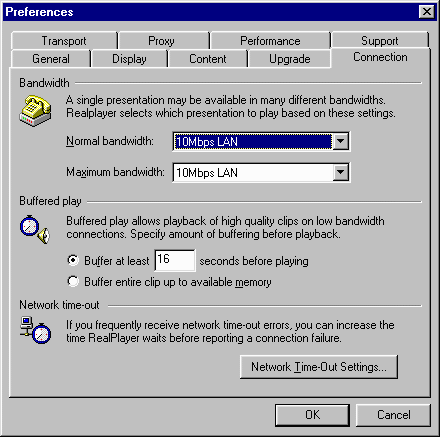 ...next, select the proxy tab, and configure as below (entering the IP address of the MailGate machine in the fields containing '192.168.1.1'): 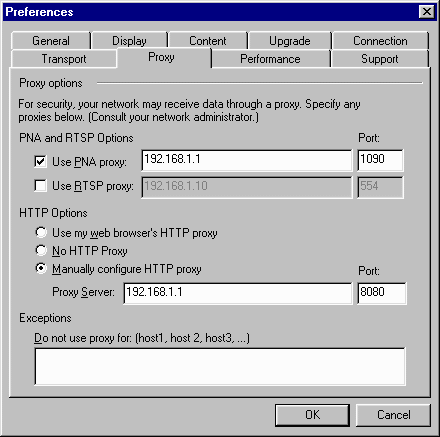 ...next, select the Transport tab, select "Use specified transports"... 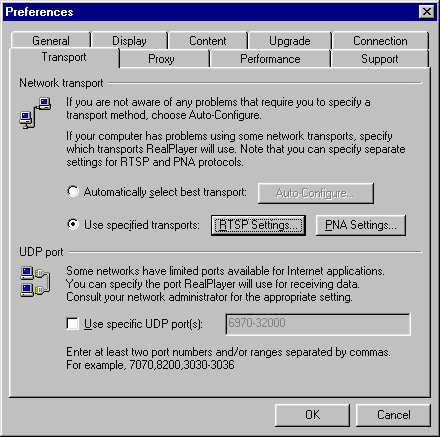 ...click the RTSP Settings button, and configure as below: 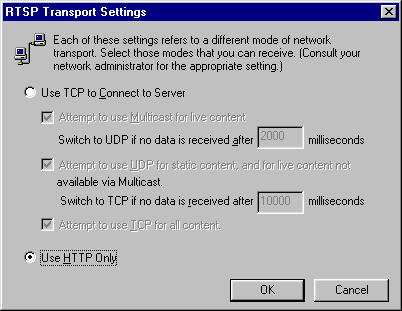 ...click OK, then click the PNA Settings button, and configure as below: 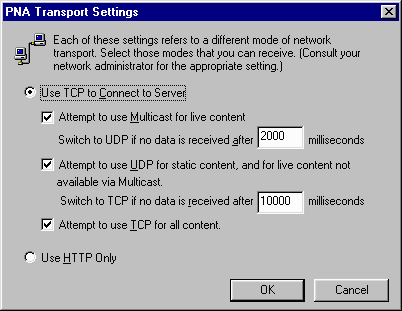  Return To FAQ Return To FAQ |
 |
|
|


