 |
|
|
|
|
 |
 |
 |
|||
|
|
SpamWeasel Support Issues Pocomail configuration 1 Click on Tools | Acounts Setup. 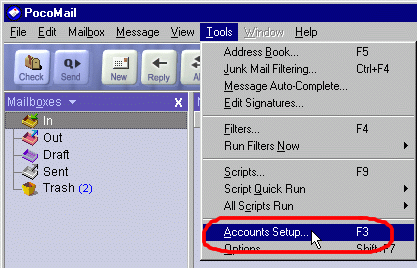 2 On the screen that appears, select your account from the left-hand pane, and this will show your current settings. 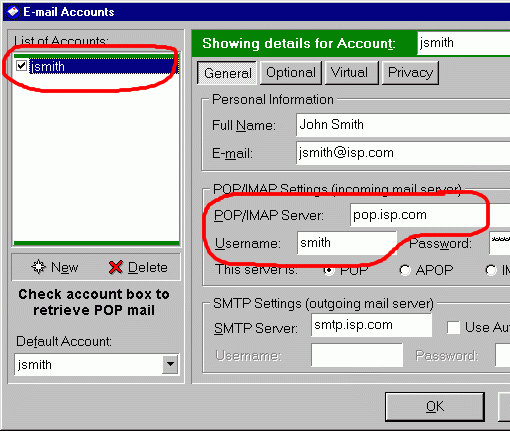 3 At the end of the "Username" field, type an "@" sign, followed by the contents of the "POP/IMAP Server" field. Next, change the "POP/IMAP Server" field to "127.0.0.1". Click OK to apply the settings. Note: Make sure that the "Use Authentication" box to the right of the SMTP Server field is not checked. 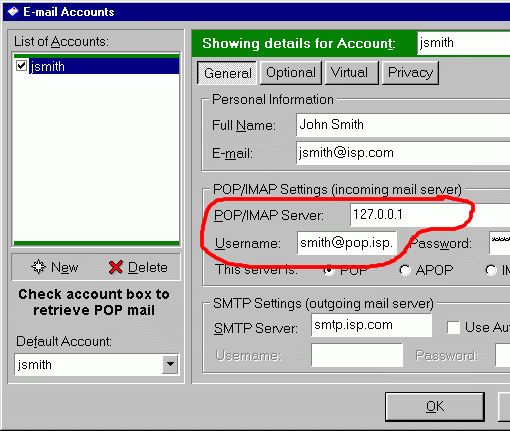 Timeouts You may wish to change the timeout setting in your e-mail client. More information on why this may be required can be found here. To change the timeout settings, click on Tools | Options. 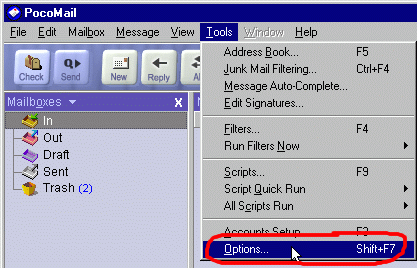 ... Select "Network Settings" from the left-hand side. You can increase the timeout setting here. 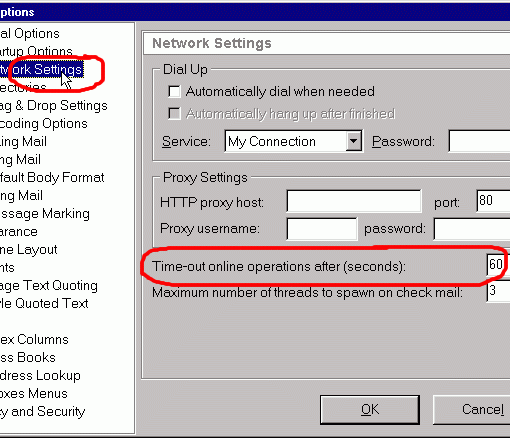  Return To FAQ Return To FAQ |
 |
|
|


