 |
|
|
|
|
 |
 |
 |
|||
|
|
SpamWeasel Support Issues Incredimail configuration 1 Click on Tools | Accounts. 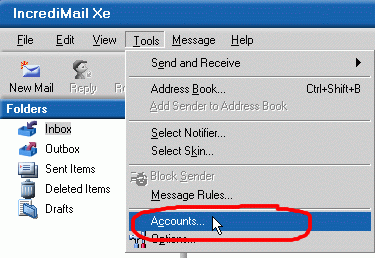 2 Double-click on the account you wish to use with SpamWeasel. 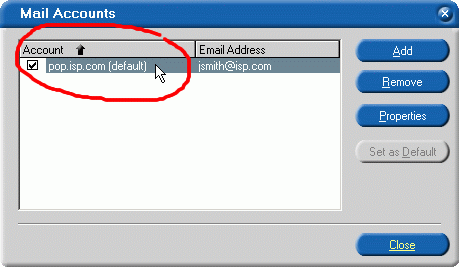 3 On the screen that appears, select the "Servers" tab. This will show your current settings. 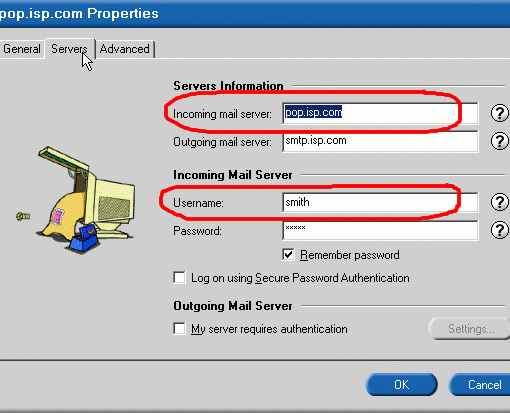 4 At the end of the "Username" field, type an "@" sign, followed by the contents of the "Incoming mail server" field. Next, change the "Incoming mail server" field to "127.0.0.1". Click OK to apply the settings. 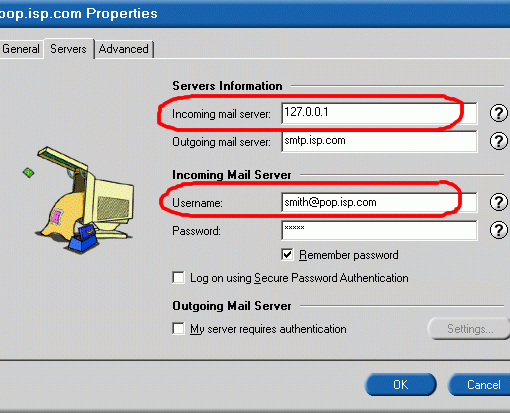  Return To FAQ Return To FAQ |
 |
|
|


